Condition Editor
Some actions use a condition editor to build a test:
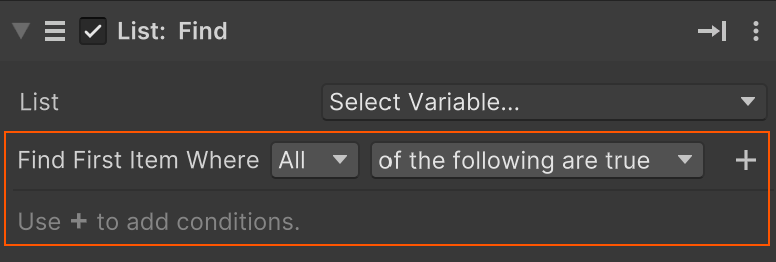
The dropdowns define the overall test context.
For example:
- Find first item where all of the following are true.
- Find first item where any of the following are false.
Use to add the conditions to test for.
For example to find an item greater than 1000 and less than 2000:
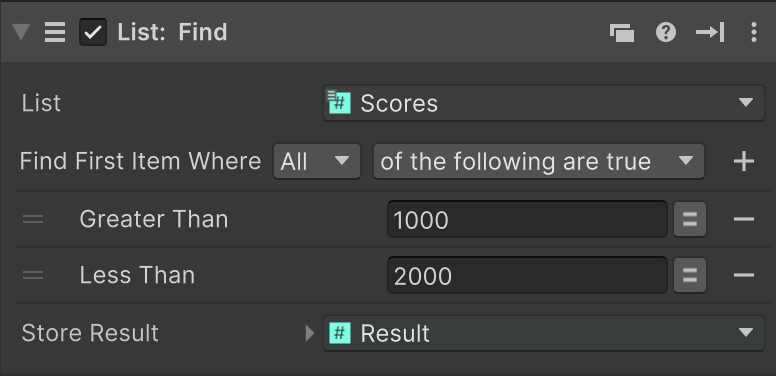
NOTE: The tests available depend on the data type being checked.
For example, for a GameObject variable, you can check the tag, name, parent, transform values, and null state:
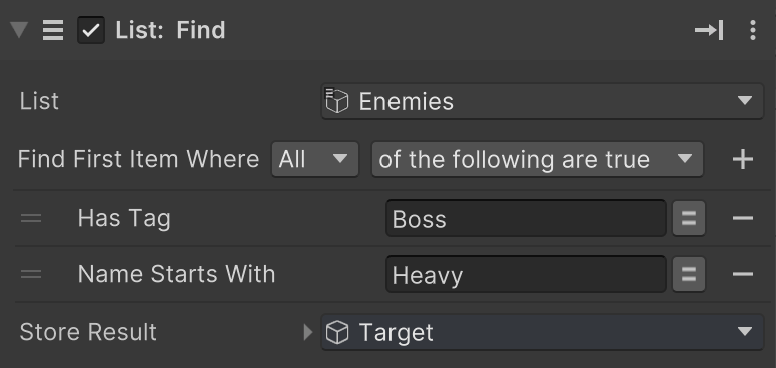
GameObject Conditions
When an action uses a GameObject condition test, the first dropdown selects which GameObject property to check. The available properties include:
NameTagParentPositionPosition 2DRotationIs NullIs Not Null
The second dropdown depends on the property type. Common examples include:
Namesupports checks such asIs,Contains,Starts With, andEnds With.Taglets you check whether the GameObject has a specific tag.Parentlets you compare against another GameObject.Position,Position 2D, andRotationlet you compare transform-related values.Is NullandIs Not Nulllet you check whether the GameObject reference exists.
Example
To find an enemy target, you might combine conditions like:
TagisEnemyNamecontainsBossIs Not Nullis true
You can then choose whether all conditions must pass, or whether any condition is enough.