Tween Actions
Tween Actions provide a simple way to create smooth animations without writing code. They let you interpolate (or "tween") values over time - for example, moving an object from one position to another, fading UI elements in and out, or scaling objects up and down.
They can be used for quick one-off effects (like a button press animation) or for longer sequences (like character introductions or camera pans).
Parameters
Most tween actions share common parameters:
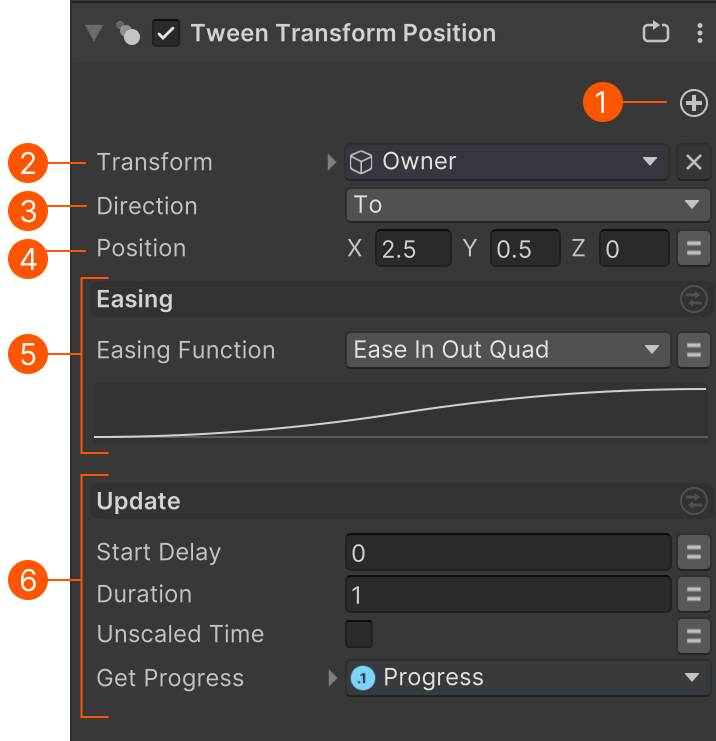
| # | Parameter | Description |
|---|---|---|
| Add Blocks | Add/remove optional blocks. | |
| Target | The target to tween. | |
| Direction | Should we tween from or to the value. To: Tweens the value from its current value to the specified value. From: Tweens the value From the specfied value to the current value. |
|
| Value | The value to tween to/from. | |
| Easing Block | Easing settings that control the tween. | |
| Update Block | Update settings. |
Easing
Easing lets you set the curve used to control the tween,
Easing Function
Choose from a list of predefined easing functions.
Use the graph to preview the curve.
Custom Curve
Use a custom animation curve to control the tween.
Update Mode
Choose the update mode that works best for the tween you need:
Time Based
The default update mode controls tweens using time settings:
| Parameter | Description |
|---|---|
| Start Delay | Time in seconds to wait before starting the tween. |
| Duration | How long the tween takes to complete in seconds. |
| Unscaled Time | Ignore the current time scale. E.g., in a pause menu where time scale might be set to zero. |
| Get Progress | Store the progress of the tween (0-1) in a float variable. Useful to feed into other actions. E.g., set the material's alpha while tweening the position. |
Speed Based
Speed-based controls let you set a target speed for the tweened value. This translates to a duration.
For example, if you tween a float value between 0 and 1 at speed 0.25, it will take 4 seconds to complete the tween: 1 / 0.25 = 4 seconds.
| Parameter | Description |
|---|---|
| Start Delay | Time in seconds to wait before starting the tween. |
| Speed | The desired speed for the tween in units per second. Lower speed = longer duration. |
| Unscaled Time | Ignore the current time scale. E.g., in a pause menu where time scale might be set to zero. |
| Get Progress | Store the progress of the tween (0-1) in a float variable. Useful to feed into other actions. E.g., set the material's alpha while tweening the position. |
Manual Update
Manual update lets you set the progress of the tween manually.
For example, you could use the distance to a target to drive a tween.
| Parameter | Description |
|---|---|
| Tween Time | Set the progress of the tween using a float variable. The value should be bwtween 0 and 1. |
Hint: Use the Float Normalize action to normalize a float value to be in the 0 - 1 range.
Loop
The Loop block is optional.
| Parameter | Description |
|---|---|
| Loop Mode | None: Play once. Loop: Restart the tween when finished. Ping Pong: Tweens forwards, then backwards, and repeats. |
| Get Loop Count | Store the number of times its looped in an integer variable. E.g., to stop looping after n loops. |