Action Browser
PlayMaker → Action Browser
The Action Browser helps you discover, preview, and add actions to your FSMs.
Tip
In some places PlayMaker 2 action names have changed from PlayMaker 1. The browser uses aliases to try and find PlayMaker 1 actions. If there is a PlayMaker 1 action you can't find please let us know on the forums.
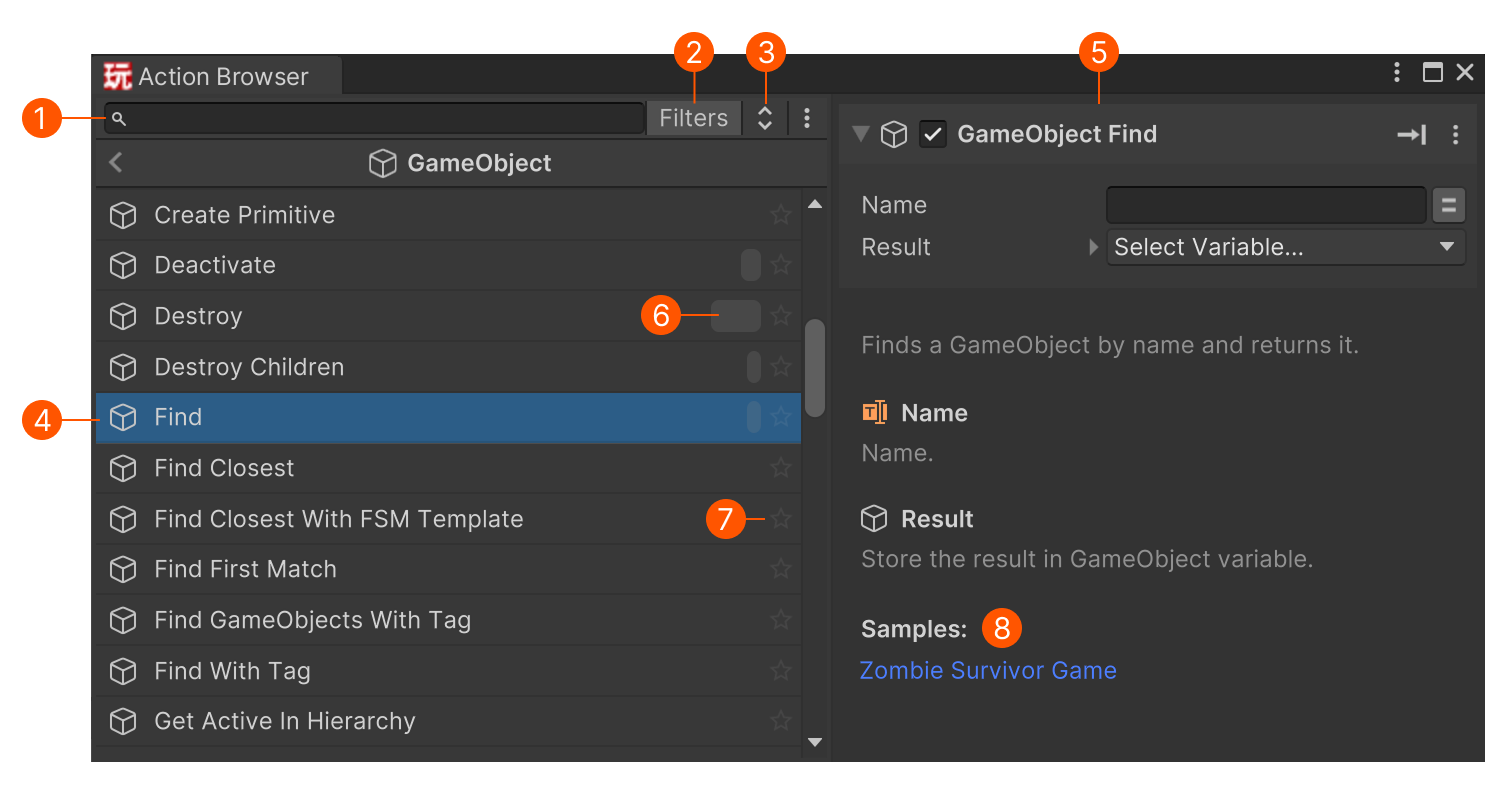
| # | Description |
|---|---|
| Search field to quickly find actions by name. | |
| Quick Filters to search within common categories. | |
| Flatten hierarchy toggle. Shows actions in a flat list. | |
| Action list. Select to preview. | |
| Action Preview for the selected action. | |
| Usage bar. Hover for count, click to find usages. | |
| Favorite toggle. Favorites appear in a special category. | |
| Shows if the action is used in any samples. Click the sample to open it in the Addons Browser. |
Quick Filters
Quick filters use 1–3 letter prefixes to limit searches to a specific category.
For example, t get position searches for “get position” in Transform actions.
- Hover over the Filters button to see a list of prefixes.
- Click the Filters button to toggle filtering on/off.
Action Preview
Select an action to open it in the preview panel.
The preview includes the Action Editor and other details.
A Samples section shows if the action is used in any samples. Click the sample to open it in the Addons Browser.
Tip
The Action Editor in preview is interactive - use features like the Convert Menu to explore related actions.
Context Menu
Right-click an action in the list for more options:
| Command | Description |
|---|---|
| Favorites | Add or remove from favorites. |
| Edit Script… | Opens the action’s C# file. Useful for inspection or custom authoring. Unavailable for built-in or DLL actions. |
Settings Menu
| Command | Description |
|---|---|
| Show Used Actions Only | Filter to only actions currently used in the project. |
| Clear Recent List | Clear the “Recent” category. |
| Scan Project... | Manually update usage stats. |
| Rebuild Search Index | Rebuilds the internal index used for searching. |
Shortcuts
| Shortcut | Action |
|---|---|
| Esc | Cancel a search |
| Up / Down | Select list items |
| Right | Open a category |
| Left | Go to parent category |
| Double-click | Add an action to the open FSM |
| Drag | Drag an action into the Graph View to create a new state with that action. |
Tip
You can drop an action outside the FSM frame and the FSM will expand to include the new state.