Update Mode
Every action has an Update Mode, giving you precise control over when and how it updates.
Hover the Update Mode icon to see a natural language summary:
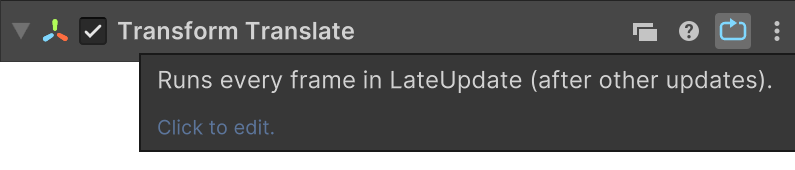
Update Modes
Each mode is indicated by a unique icon and color:
| Icon | Update Mode | Description |
|---|---|---|
 |
Update | Runs in Unity’s Update() loop. Most common choice. |
 |
Fixed Update | Runs in FixedUpdate() - used for physics-related behavior.(Green) |
 |
On Animator Move | Runs during OnAnimatorMove(), after animation evaluation but before IK.(Blue) |
 |
Late Update | Runs in LateUpdate() - often used for tracking objects after physics.(Red) |
 |
Every Frame | Runs continuously every frame. |
 |
Blocking | Prevents the next action from starting until this one finishes. See Blocking Actions. |
 |
On Event | Listens for an event instead of updating per frame. |
Editing Update Mode
Click the Update Mode icon to open a detailed popup:
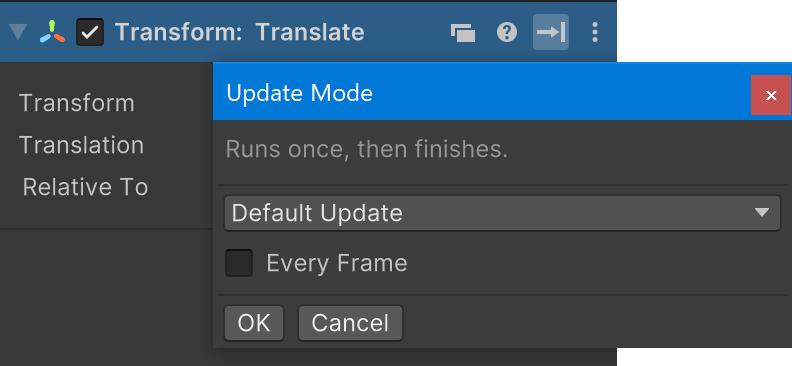
Use this popup to edit the Update Mode settings.
A summary updates as you make changes.
Every Frame
When Every Frame is enabled, the action repeats every frame.
If unchecked, the action runs once, then finishes.
Per Second
Some actions have a Per Second toggle when Every Frame is enabled:
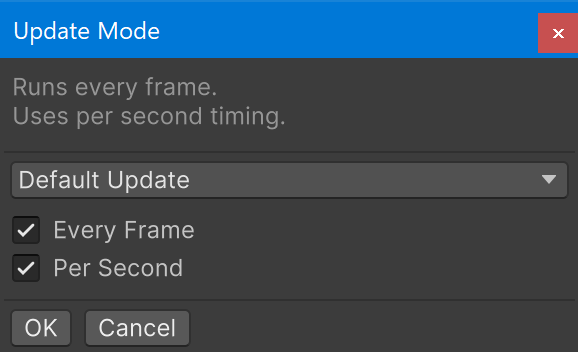
This lets the action use deltaTime for consistent timing across frame rates.
For example, Translate uses Per Second to interpret input as speed instead of distance.
Blocking Actions
Blocking actions delay the start of following actions until they finish.
- Other already running actions continue as normal.
- When a blocking action ends, PlayMaker stops all running actions and begins the next action in the list.
This creates simple action sequences without needing additional logic:
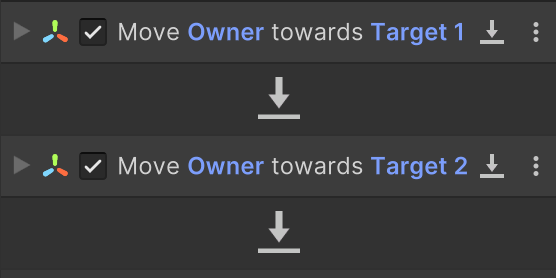
In this example, the FSM moves toward Target 1, then Target 2, one after the other.
The Blocking option is only available on actions that can finish.
Upgrade Tip
Blocking actions replace Action Sequences from PlayMaker 1 with a more flexible per-action setting.
See also: Sequence Actions