Random Get Direction In Cone
Gets a random direction vector within a cone around a central axis.
Supports optional falloff to bias the distribution toward the cone’s center or edges.
Use it to generate random aim directions, spread patterns, or cone-based movement - such as bullet spray, particle bursts, or sensor vision cones.
Parameters
| Parameter | Description |
|---|---|
| Direction | The central axis of the cone. Defaults to Vector3.forward. |
| Angle | Maximum angle from the central axis. The total cone angle is twice this value. |
| Radius | Length or magnitude of the resulting direction vector. |
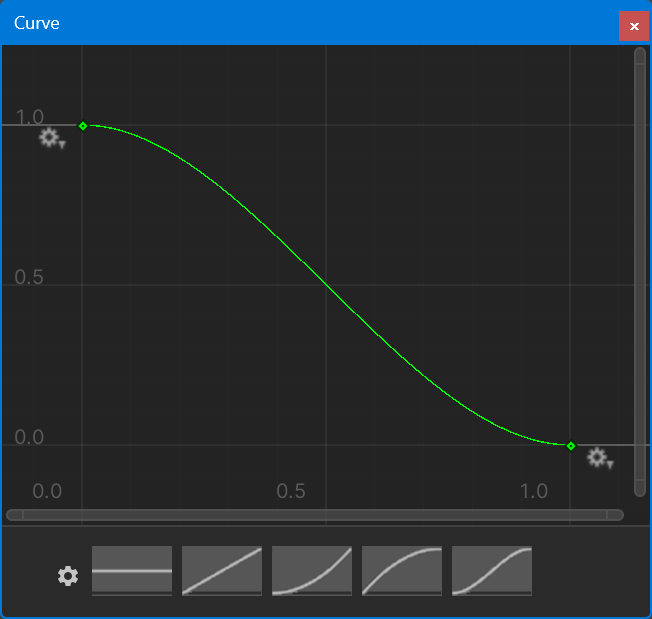
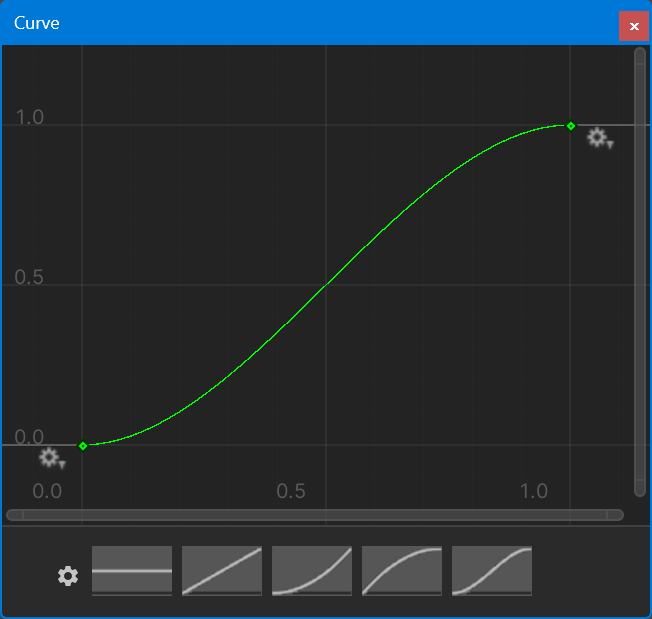
| Falloff | Optional AnimationCurve that controls the distribution across the cone.Leave unset for a uniform distribution. |
| Store Direction | Vector3 variable to store the resulting world-space direction. |
Falloff
Biased to center:
Biased to outer edge:
Tips
- Uniform vs. curved: Leave Falloff unset for an even spread. Use a falloff curve to bias toward the center or edges.
- Example: For a shotgun spread, set a wider Angle and leave Falloff uniform. For a focused beam, narrow the Angle or bias the curve toward the center.
- Normalization: The stored direction includes Radius magnitude. Use
Normalizeif you need a unit vector. - Axis handling: If the Direction is zero, the action defaults to
Vector3.forward.
Common Pitfalls
- Angle = 0: Returns a direction equal to Direction x Radius (no random variation).
- Negative radius: Produces a reversed vector; use positive values for outward directions.
- Extreme falloff values: Curves exceeding 1.0 may create concentrated or erratic distributions.