Tracking Actions
Tracking actions continuously sample a Transform and turn its motion into useful, frame-independent stats like speed, distance, path length, peaks, and more.
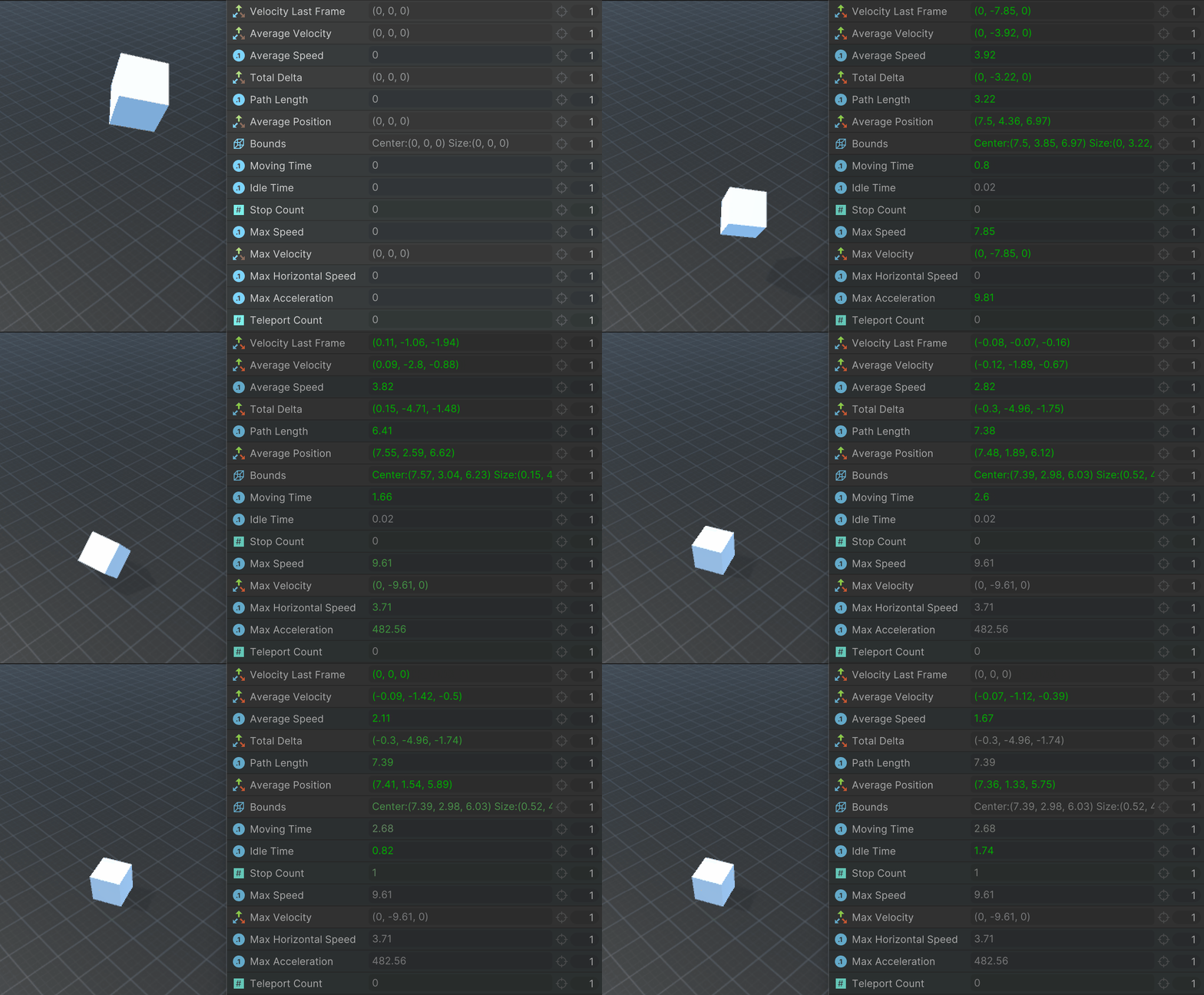
Add them to a state:
- To drive gameplay (e.g., fall damage, aim leading, attack triggers)
- To debug and tune movement.
Update Mode
Tracking starts when the state is entered and stops when the state is exited.
Tracking actions default to LateUpdate so they sample after most movement actions in Update.
For non-kinematic Rigidbody or Rigidbody2D objects, prefer FixedUpdate for more accurate physics-based measurements.
Transform Track Position
Tracks a Transform’s world position over time and provides a set of instantaneous, average, cumulative, and peak metrics.
Parameters
| Parameter | Description |
|---|---|
| Transform | Transform to track. |
| Speed Threshold | Speed below which the object is considered idle (units/s). |
| Teleport Step Threshold | If a single step exceeds this distance, treat it as a teleport (excluded from path/velocity). 0 = disabled. |
Outputs
Instant & Averages
| Output | Type | Description |
|---|---|---|
| Velocity Last Frame | Vector3 | Velocity over the last frame (units/s). |
| Average Velocity | Vector3 | Average velocity since entering the state (displacement ÷ time). |
| Average Speed | Float | Path length ÷ time tracked. Differs from |
Distance & Area
| Output | Type | Description |
|---|---|---|
| Total Delta | Vector3 | Displacement since entering the state (current - initial). |
| Path Length | Float | Accumulated distance traveled (counts wiggles and backtracking). |
| Average Position | Vector3 | Mean world position over all samples. |
| Bounds | Bounds | Axis-aligned bounds of all sampled positions. |
Timing
| Output | Type | Description |
|---|---|---|
| Moving Time | Float | Time with speed ≥ Speed Threshold. |
| Idle Time | Float | Time with speed < Speed Threshold. |
| Stop Count | Int | Number of moving→idle transitions (debounced by threshold). |
Peaks & Events
| Output | Type | Description |
|---|---|---|
| Max Speed | Float | Peak speed since entering the state. |
| Max Velocity | Vector3 | Velocity vector when peak speed occurred. |
| Max Horizontal Speed | Float | Peak speed in XZ-plane (ignores Y). Useful for top-down/nav-plane analysis. |
| Max Acceleration | Float | Peak acceleration magnitude (units/s²), derived from Δv/Δt. |
| Teleport Count | Int | Number of steps exceeding Teleport Step Threshold. |
Practical Examples
Drive animation parameters from motion
- Feed VelocityLastFrame.magnitude (or AverageSpeed) into an Animator Speed float.
- Feed VelocityLastFrame.x into an Animator HorizontalSpeed float.
- Use Max Speed spikes to trigger sprint/blend trees.
Measure fall height on landing
- Track the player while airborne.
- In Landed, read TotalDelta.y to get fall height and drive damage/screen shake.
Find the “center of activity” of an enemy
- Run TransformTrackPosition on the enemy for a few seconds and read Average Position to get a stable centroid of where it tends to be.
- Useful for placing prediction gizmos, clustering analysis, or anchoring VFX (e.g., dust clouds) where the enemy spends most time.
Lead a moving target for projectiles
- Use Average Velocity (or Velocity Last Frame) of the target to compute an intercept point
- Aim/launch towarda that point instead of the current position for smarter hitscan-like shots.
Trigger an attack when the player is idle
- If Stop Count exceeds a threshold value, trigger an event that forces the player to run!
- If Idle Time exceeds a threshold attack!
Tweak gameplay parameters
- Measure speed/acceleration during dashes, jumps, or knockbacks.
- Log path length and average speed to tune AI or player locomotion.
- Build heatmaps or bounds of exploration for analytics/debug.
FAQ
Q: What’s the difference between Average Speed and Average Velocity?
A: Average Velocity is vector displacement over time - direction matters. Average Speed is total path length over time - it’s always non-negative and grows with back-and-forth motion.
Q: My object occasionally “teleports” (e.g., level streaming). Won’t that skew averages?
A: Set Teleport Step Threshold to a distance larger than any normal per-frame motion. Teleport steps are counted but excluded from velocity/path calculations.
Q: Should I use LateUpdate or FixedUpdate?
A: Use the default (LateUpdate) when movement is driven in Update. Switch to FixedUpdate when you drive motion in the physics step so sampling aligns with the step.