FSM Template
An FSM Template is a reusable asset that stores the logic of an FSM in a shareable form.
Templates are ideal for modular, repeatable behavior - such as interactable objects, enemy patterns, or UI controls.
But remember, Templates are Unity assets, so they cannot store references to scene objects.
🔗 See Referencing Scene Objects for strategies to work around this limitation.
Creating FSM Templates
There are several ways to create new FSM Templates:
- Use in the FSM Templates Browser.
- Use New in the FSM Template Component.
- In the Project Window:
Create > PlayMaker > FSM Template
To save an existing FSM as a template:
- Select an FSM Component Settings → Save Template.
- Right-click an FSM Node and Save Template.
Inspector
The Inspector shows editable properties of the template:
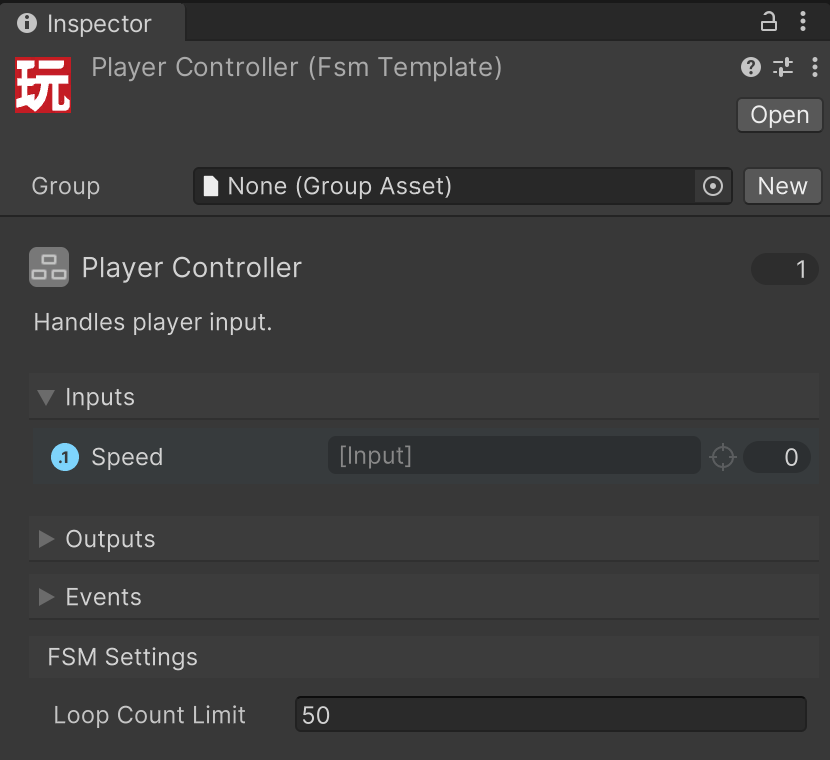
| Control | Description |
|---|---|
| Group | Assign a Group to help organize templates in the editor. |
| Icon Style | Click to choose an icon and color for this template. |
| Name | Rename the asset to rename the template. Use clear, descriptive names. |
| Description | Short summary shown in tooltips and UI lists. |
| Used Count | Shows how many times this template is used. Click to open a finder window. |
Inputs
Variables exposed as Inputs in the Variables Inspector.
These allow external FSMs or components to configure the template at runtime.
Outputs
Variables exposed as Outputs in the Variables Inspector.
Used to pass results or updated data back to the host FSM.
Events
Templates can send events to the FSM that uses them (the “host”) using the Send Event To Host action.
This lets the template respond or trigger transitions in the host FSM when something happens internally.