PlayMaker FSM (Template)
Add Component > PlayMaker > PlayMaker FSM (Template)
The FSM Template Component runs a saved FSM Template on a GameObject.
You can customize its behavior using input variables, making it ideal for reusable FSM logic shared across objects or scenes.
Note
With great power comes great responsibility. Because FSM Templates can be used in many places you should be extra careful making changes to them!
At runtime, the template instantiates an FSM that behaves exactly like a regular FSM.
Inspector
Use the inspector to assign an FSM Template to this component:
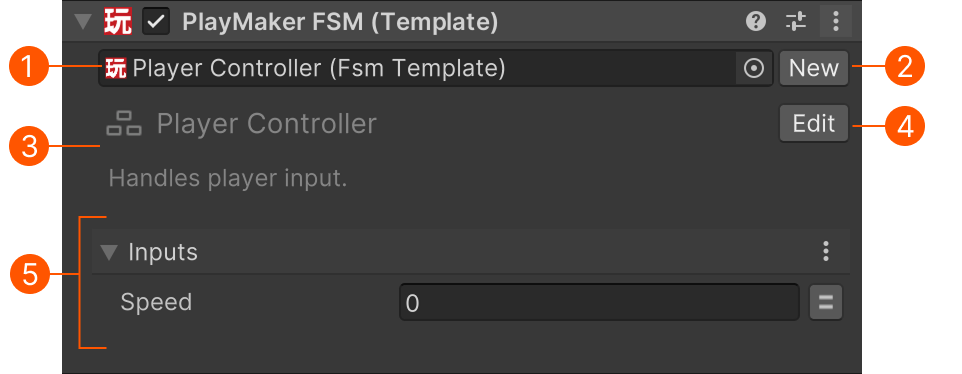
| # | Control | Description |
|---|---|---|
| Template | The template to instantiate at runtime. | |
| New | Create a new FSM Template in the FSM Editor. | |
| Header | Read-only name and description from the selected template. | |
| Edit | Open the selected template in the FSM Editor. | |
| Controls | Shows variables marked as Input in the Variables Inspector. Input values are passed in when the FSM starts running. |
Play Mode
While playing, the inspector shows the currently active state:
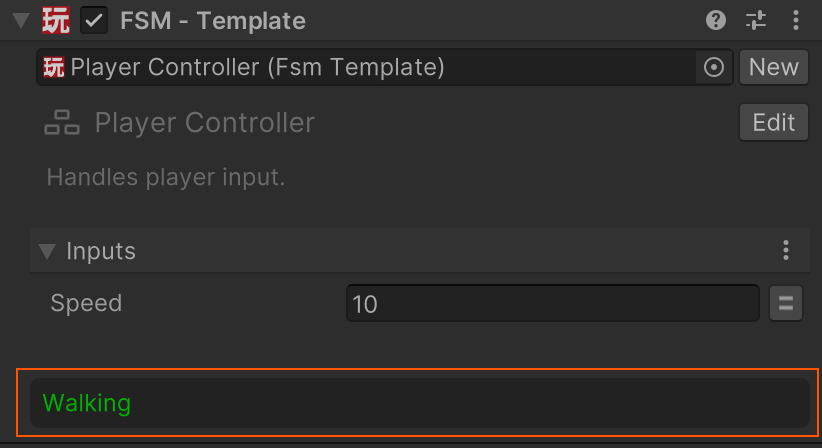
This helps you debug the behavior of the instantiated FSM.
Settings Menu
These options are added to the component's context menu:
| Command | Description |
|---|---|
| Enable Logging | Enable or disable logging to the FSM Log. Logging adds overhead in the editor. Disable it for performance-critical FSMs. |
Performance Tip
If an FSM Template Component is spawned many times (e.g., for bullets or enemies), disabling logging can reduce overhead and improve editor performance (logging is disabled in builds).
Working with Prefabs
FSM Template Components work well on prefabs - and are often the best option for reusable behaviors.
Prefabs cannot store references to scene objects, but they can store a reference to a template.
🔗 See Referencing Scene Objects for strategies to find or pass scene objects to a template-based FSM.
When to Use
Use an FSM Template Component when:
- You want to reuse the same FSM logic across multiple GameObjects.
- You’re building a library of templates to share across your project.
- You want a clean separation between reusable logic and scene setup.