Enum Definition
Enum Definitions let you create custom enums for your project.
The generated enum can be used anywhere in your project, including PlayMaker FSM enum variables and actions.
IMPORTANT
Enum Definitions generate code.
If Unity reports an error after generating the enum, it usually means the new code has the same name as existing code in your project.
Use Delete Generated Code to remove the generated file, then check the error message for the conflicting enum or namespace name.
Creating Enum Definitions
In the Project Window:
Create > PlayMaker > Data > Enum Definition
Inspector
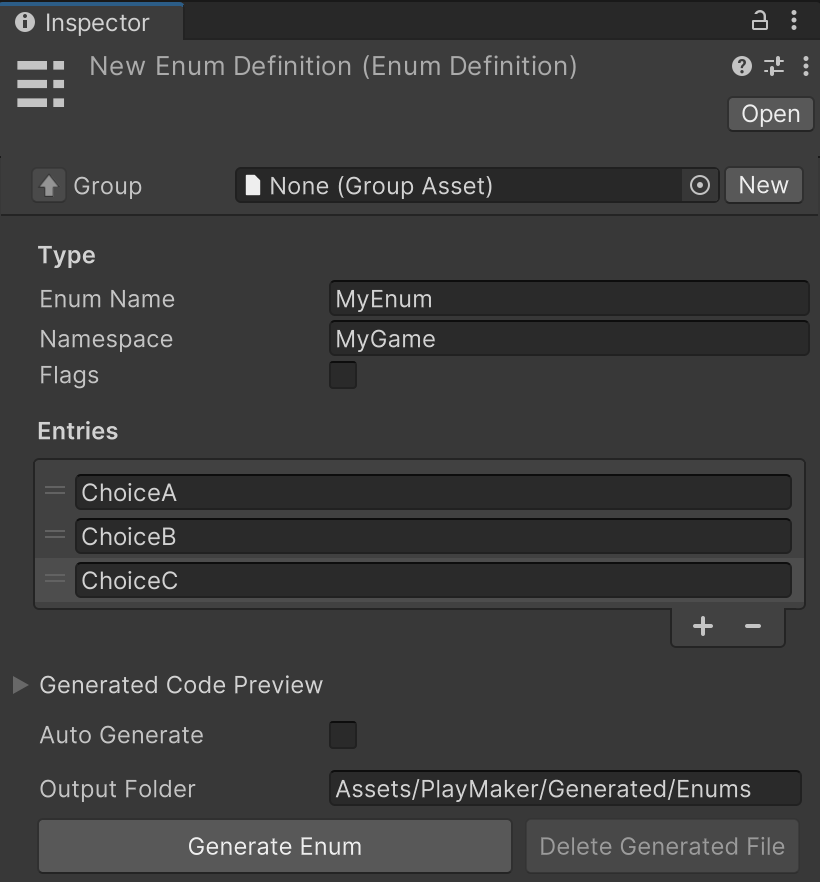
Inputs
| Control | Description |
|---|---|
| Group | Optional group asset used to organize this Enum Definition. |
| Enum Name | Sets the generated enum type name. |
| Namespace | Namespace for the generated enum code. This should be unique in your project, often using a format like com.your-domain. |
| Flags | Generates the enum with the C# [Flags] attribute so entries can be combined. |
| Entries | List of enum values to include in the generated type. Use the + and - buttons to add or remove entries, and drag handles to reorder them. |
Generated Code
| Control | Description |
|---|---|
| Generated Code Preview | Expands a preview of the generated code. |
| Auto Generate | Automatically regenerates the enum code when you make changes. |
| Output Folder | Sets where the generated enum .cs file will be created.This can be a relative path, but it must be inside your project's Assets folder. |
| Generate Enum | Generates or regenerates the enum code file. |
| Delete Generated File | Removes the generated enum code file. |
Note
This asset generates C# enum code.
Please keep in mind:
- Renaming or removing entries may affect FSMs that use this enum.
- Reordering entries is safe because generated values stay stable.
- The generated file should not be edited by hand. If an enum needs to change, update this asset and regenerate the code.
Flags
Use Flags when you want one value to hold multiple choices at the same time.
Without Flags, an enum usually means "pick one option":
IdleRunJump
With Flags, the enum can mean "combine any of these options":
CanMoveCanJumpCanShoot
For example, a character could be both CanMove and CanJump at the same time.
This is useful for things like abilities, permissions, tags, or states that can be mixed together.
If your enum is just a list where only one item should be selected, leave Flags turned off.