Global Variable
A Global Variable is a variable that can be accessed and shared by any FSM in your project.
Global Variables are stored as assets and are ideal for:
- Game-wide state, like
Score,Player Lives,Game Over - Shared settings, like
Player Name,Music Volume,Difficulty
Because they're assets, they can be saved in FSM Templates and prefabs.
Creating Global Variables
You can create Global Variables in several ways:
- Use in the Global Variables Browser
- Select New Global Variable in the Variable Selector Popup
- In the Project Window:
Create > PlayMaker > Global Variable
Inspector
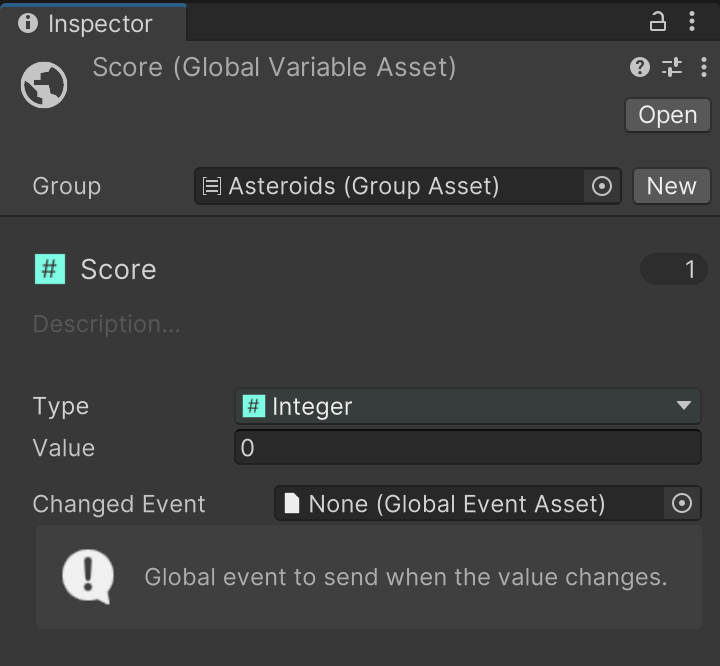
| Control | Description |
|---|---|
| Group | Assign a Group to organize variables in the editor. |
| Name | Rename the asset to name the variable. Use descriptive names for clarity. |
| Description | Optional short tooltip shown in variable lists and editors. |
| Used Count | Shows how many FSMs use this variable. Click to open a Finder window of references. |
| Type | Data type of the variable. ⚠️ Changing the type will break all references to this variable. |
| Value | Default value used when the game starts. |
| Changed Event | A Global Event to send automatically when this variable changes. |
Play Mode
In Play Mode, the Inspector shows both the Default and Current value of the Global Variable:
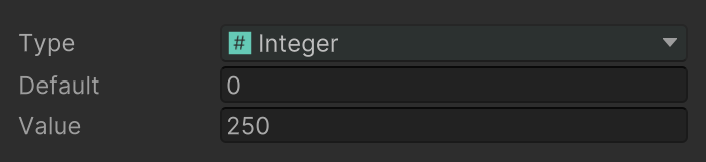
This is useful for debugging and tracking variable changes as your FSMs run.
When to Use
Use a Global Variable when:
- You need to share a value across FSMs or GameObjects.
- You want a persistent reference that doesn't live in a single FSM.