Data Item UI
DataItemUI connects fields in a Data Definition to UI elements.
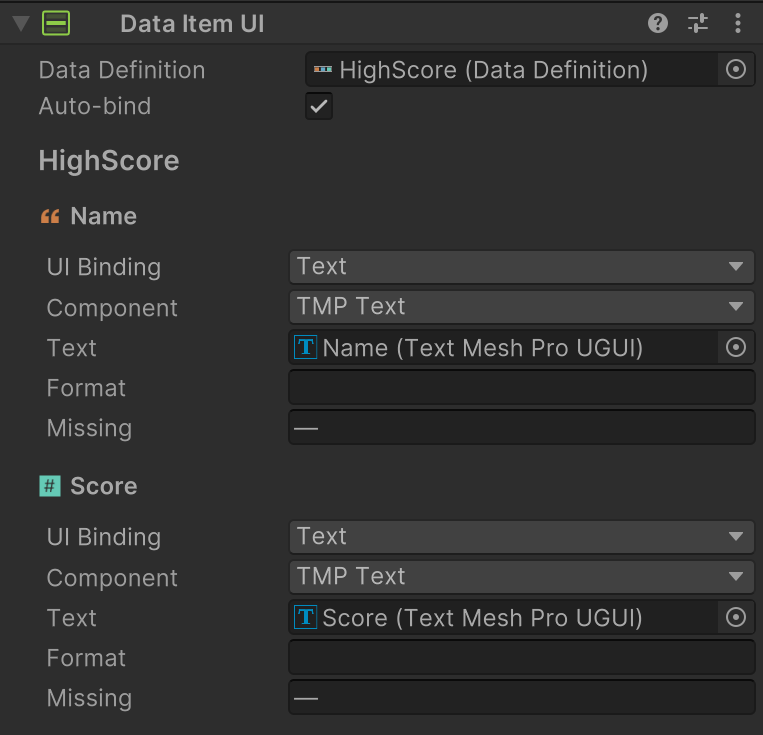
A typical usage is to bind items in a DataTableWidget to UI.
Setup
- Add DataItemUI to the root of the UI that you want to bind.
- Assign optional fallback
Data Definition. - Configure
Auto-bindandBindingsfor each data field.
Inspector Fields
| Field | Description |
|---|---|
| Data Definition | Fallback definition used when runtime data does not provide one. |
| Auto-bind | Fills missing bindings by matching child UI object names to field names. |
| Bindings | One entry per field, each targeting a UI control. |
Supported binding target types:
- Text (
TMP_Textor legacyText) - Toggle
- Slider
- Image (Sprite)
Tips
- Keep UI element names aligned with Data Definition field names to take advantage of
Auto-bind. - Pair with item action components (for example DataItemButtonAction) to send item commands.