Data Item Long Press Action
DataItemLongPressAction sends a command after the pointer is held on a row element for a configured duration.
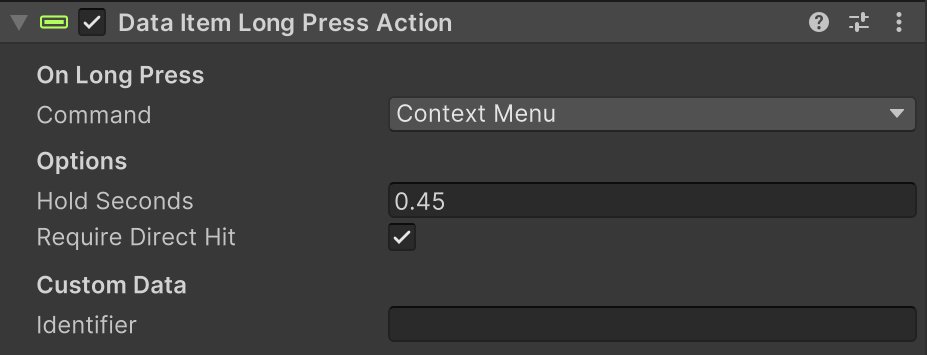
Use it for touch-first actions like ContextMenu without needing custom press timers in your FSM.
What It Does
- Starts timing on pointer down.
- Sends one command when hold time reaches
Hold Seconds. - Cancels if the same pointer is released or exits before the timer finishes.
- Sends an
OnLongPresssystem event to the root item GameObject.
Setup
- Add Data Item Long Press Action to the row object or control you want press-and-hold behavior on.
- Set
Command(commonlyContextMenu). - Set
Hold Secondsto the required press duration. - Optional: keep
Require Direct Hitenabled so covered elements do not trigger. - Optional: set
Identifierif downstream logic needs control-specific routing.
Inspector Fields
| Field | Description |
|---|---|
| Command | Row action command sent when long-press completes. |
| Hold Seconds | Time (in seconds) required before firing. |
| Require Direct Hit | Requires this exact GameObject to be the direct hit at pointer down. |
| Identifier | Optional control label included with the request. |
Runtime Notes
- Timing uses unscaled time, so it still works when gameplay time scale changes.
- Direct-hit eligibility is captured at pointer down and reused during the hold.
- Only the same pointer that started the press can end or cancel it.
Tips
- Keep
Hold Secondsaround0.35to0.6for mobile-friendly interaction. - Pair this with click actions to support both quick select and hold-for-menu behavior.
- If long-press should work anywhere in the row hierarchy, disable
Require Direct Hit.