Using Enums
Enums (short for Enumerations) let you define a list of named options instead of using numbers or strings. They make your FSMs easier to read, manage, and debug.
For example, the System.DayOfWeek enum defines: Friday, Saturday, Sunday, Monday, Tuesday, Wednesday, Thursday.
This Enum is much more legible than using 0, 1, 2, 3, 4, 5, 6 to represent the days of the week!
Enum Types
Enum variables can reference any public enum defined in your project or in Unity/third-party libraries.
You can select the enum type from a dropdown in the variable inspector.
Example
In this example we use an Enum Switch action to decide what to do based on the value of the Today variable:
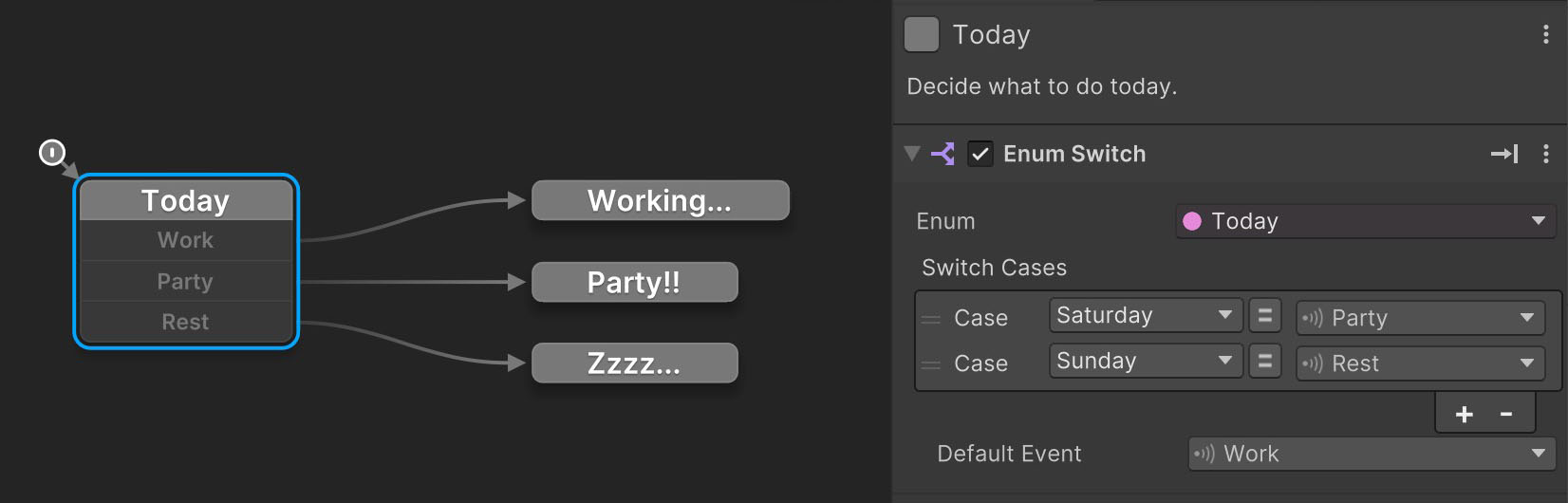
This switch describes these cases:
- If
TodayisSaturday, send the Party event. - If
TodayisSunday, send the Rest event. - Otherwise, send the Work event.
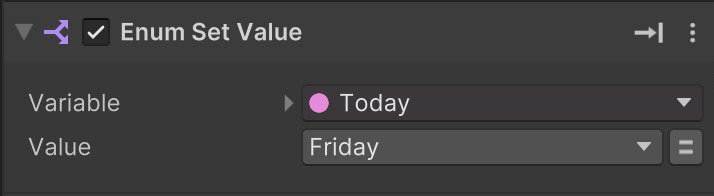
We can set the Today variable value using Enum Set Value action:
Custom Enums
Custom enums are easy to write - even if you don't know how to code.
An enum is just a list of names. You define them once in a simple script, and they show up as options in PlayMaker.
For example, this script defines two enums: one for player color, and one for chess piece types:
namespace HutongGames.Chess
{
    public enum PlayerColor { White, Black }

    public enum PieceType { King, Queen, Rook, Bishop, Knight, Pawn }
}
Step by step
To create your own enum:
- Right-click in the Project window:
Create > C# Script - Name it something like MyEnum.
- Double-click to open it.
- Replace the contents with a namespace and your enum (like above).
- Save the file and return to Unity.
Namespaces
Always use a namespace for scripts!
It's common practice to use a domain name you own to minimize the chance of name conflicts with other scripts.
My Enum Doesn't Show Up?
Make sure your custom enum is:
- Public
- Not in an Editor folder
Enum Definitions
If you don’t want to write code, Enum Definitions let you create C# enums using a simple asset instead.
An Enum Definition generates enum code from editor-friendly settings such as the enum name and list of entries. The generated enum can be used anywhere in your project, including PlayMaker FSM enum variables.
Enum Definitions are the recommended way to create enums if you prefer working visually rather than writing C#.
Summary
Enums are a great way to:
- Replace cryptic numbers or strings with readable labels
- Improve the clarity of decision-making logic in FSMs
- Reduce errors from typos or mismatched string comparisons