Data Item Click Action
DataItemClickAction turns a tap or mouse click on a row element into a data item command.
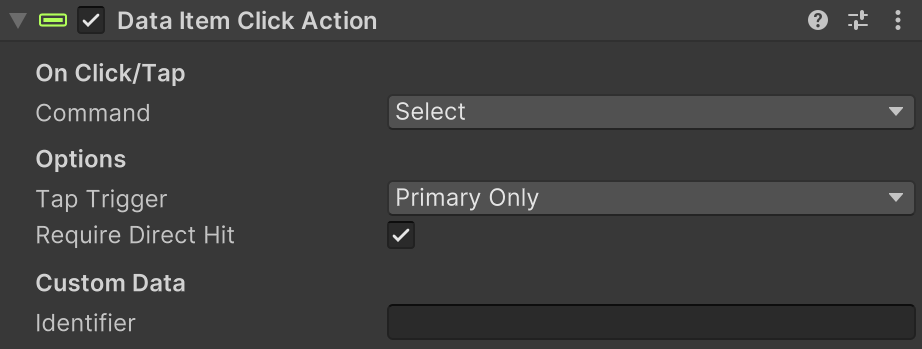
Use it when row clicks should request actions like Select, ToggleSelect, or ContextMenu.
What It Does
- Sends one configured command to the parent data widget when clicked.
- Filters input by click type (
Any,Primary, orSecondary). - Optionally requires this exact object to be the direct UI raycast hit.
- Sends an
OnPointerClicksystem event to the root item GameObject.
Setup
- Add Data Item Click Action to the row object you want clickable.
- Set
Commandto the action your widget should handle. - Set
Tap Triggerto control which pointer button can fire it. - Optional: keep
Require Direct Hitenabled to block clicks through overlays. - Optional: set
Identifierif FSM logic needs to know which control fired.
Inspector Fields
| Field | Description |
|---|---|
| Command | Row action command sent to the data widget. |
| Tap Trigger | Which click/tap type can trigger the action: AnyClickOrTap, PrimaryOnly, or SecondaryOnly. |
| Require Direct Hit | Only fires when this exact GameObject is the top raycast hit. |
| Identifier | Optional control label included with the request. |
Runtime Notes
- Touch taps count as primary input.
- With
Require Direct Hiton, parent/background objects do not fire if another UI graphic is on top. - The parent data widget host handles the command.
Tips
- Use
PrimaryOnlyfor normal row selection. - Use
SecondaryOnlyfor desktop context actions without affecting left-click selection. - Keep
Identifiervalues consistent when multiple click targets share the same row.