Global Variable Text Binding
A Global Variable Text Binding displays a PlayMaker Global Variable in a UI text component.
This is ideal for:
- Score displays
- Currency counters
- Player names
- Objective text
- Lists of collected items or status entries
Widget setup:
- Add and configure a Global Variable Text Binding component.
- Assign the Global Variable you want to display.
- Assign a TextMeshProUGUI or UI Text target.
- Update the Global Variable and the text refreshes automatically.
Global Variable Text Binding Component
Add Component -> PlayMaker -> Bindings -> Global Variable Text Binding
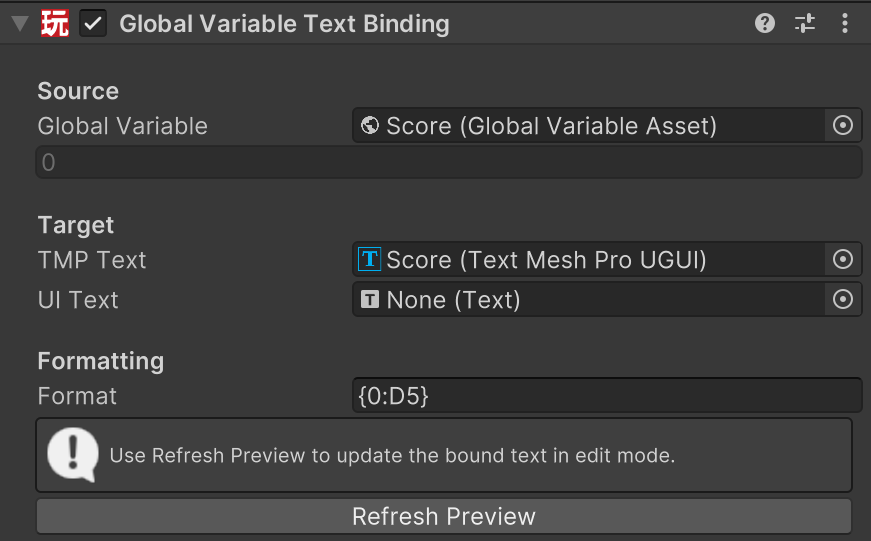
Parameters
| Field | Description |
|---|---|
| Global Variable | The Global Variable Asset to read from. |
| TMP Text | The TextMeshProUGUI component to update. If not assigned, the component tries to find one on the same GameObject. |
| UI Text | The legacy Unity UI Text component to update. Used if TMP Text is not assigned. |
| Format | Format string for single values. Use {0} for the value. Leave empty to use the value's default text. |
| Item Format | Optional format string applied to each item when the variable contains a list or array. |
| List Separator | Separator used between list items. Supports escaped characters like \n, \t, and \\. |
| Refresh Preview | Updates the binding in the editor so you can preview formatting. |
Notes:
- If both TMP Text and UI Text are available, TMP Text is used first.
- Strings are treated as a single value, not as a list of characters.
- If the variable contains a list or array, each item is formatted and then joined using List Separator.
Actions
Global Variable Text Binding does not require a dedicated widget action.
- It listens for Global Variable changes automatically.
- Use your normal PlayMaker logic to set the Global Variable.
- The binding updates the text when the value changes.
Tips
- Use Format like
Score: {0}orGold: {0:0}to control how values appear. - Use List Separator set to
\nto display list values on separate lines. - Use Item Format like
- {0}for simple bullet-style item lists.