Variables
A variable is a named container for a value.
Examples:
Livesstores the number of lives a player has.Positionstores the current position of an enemy.
Tip
Use clear, consistent names for variables to avoid confusion as your FSMs grow.
Actions can use variables as parameters:

A variable has several advantages over a constant value:
- It has a name that makes its value more meaningful (e.g.,
Livesinstead of 3). - A variable can be used in multiple places with its value updated in one place.
- A variable's value can change at runtime.
The last quality lets actions manipulate values.
For example:
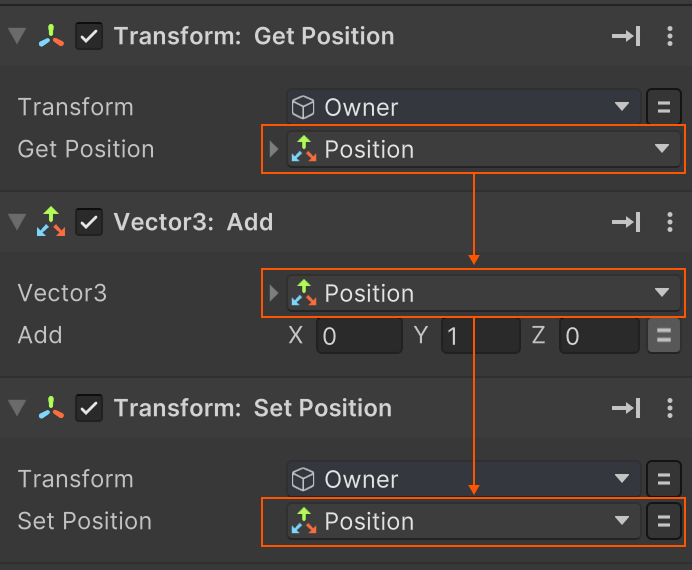
- Get Position stores the Owner's position in a variable called
Position - Vector3 Add adds an offset to
Position - Set Position sets the Owner's position to the new value in
Position
Global Variables
Global variables can be accessed by any FSM.
They are useful for storing game state like Player Lives or Score
Or values that are shared in many places, like Player1 Color or Player Name
Use the Global Variables Browser to manage global variables.
Data Types
Common variable data types and their potential usages:
Float
A number that can have decimal places, useful when precise values are needed, like measuring distance, temperature, or percentages.
Examples: Speed, Height, Weight
Integer
A whole number, used for counting discrete things.
Examples: NumberOfLives, HitCount, NumberOfKeysFound
String
Text, useful for names and labels.
Examples: PlayerName, LevelName, PopupText
Bool
A boolean, true/false value, useful for storing binary state.
Examples: IsOn, IsOpen, IsLocked
GameObject
Stores a reference to a GameObject.
GameObjects can either be in the Scene or be Prefab assets in the Project.
Examples:
- A prefab to spawn.
- The object hit by a raycast or collision.
- A scene object to enable/disable.
Vector3
Contains 3 float values (x, y, z), useful for storing 3D information.
Examples: Position, Velocity, Scale
Vector2
Contains 2 float values (x, y), useful for storing 2D information.
Examples: Position, Velocity, Scale
Rect
Contains 4 float values (x, y, width, and height) that define rectangular areas.
Examples: ScreenArea, EndZone, TeleportZone
Quaternion
Represents a 3D rotation. They are an advanced topic in 3D math, but in PlayMaker you typically use them to store a rotation without worrying about exactly how the rotation is represented.
Enum
Enums represent named options.
For example, the System.DayOfWeek enum defines: Friday, Saturday, Sunday, Monday, Tuesday, Wednesday, Thursday.
See the Using Enums guide.
List Variables
List variables store a collection of values of a given type. E.g. A Float List stores float values, a GameObject List stores GameObject values etc.
Use list actions to add items, remove items, sort items, find items, etc.
Data Records
A data record stores custom fields defined by a Data Definition.
For example:
- A HighScore Data Definition might be a string Name, integer Score, and float Time.
- A Data Record using this definition is a single High Score instance: Bob, 550, 10.
Use Data Actions to read and write data record fields.
See Also
- Actions - Use variables as parameters in FSM logic.
- Variables Inspector - Manage variables used by an FSM.
- Global Variables - Share values between FSMs.
- Using Enums - Work with named options instead of raw values.
- List Actions - Manage collections of values.