Actions
Actions are the core units of behavior in PlayMaker.
Each one performs a specific task, like:
- Play an animation
- Test for a collision
- Check if a button is pressed
- Move a game object toward a target
For example, setting an object's position:
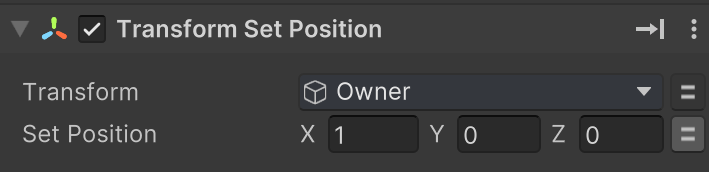
Collapsed actions show a nice summary:

Combining Actions
You combine actions in states to build behaviors.
For example, combine Get Axis and Translate actions to move a character based on input:
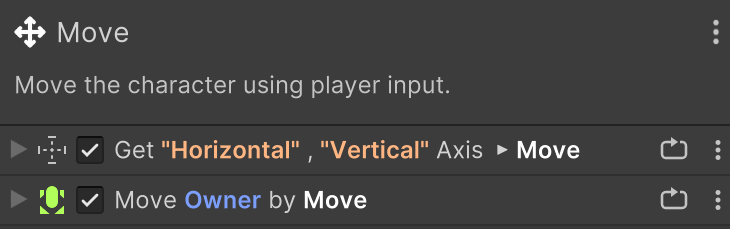
Use the Action Browser to find actions.
Variables and Events
Actions are similar to MonoBehaviours but can use variables and send events.
For example, set the camera FOV to the value stored in a WideAngle variable:

Or send a Shoot event when the Fire1 button is pressed:
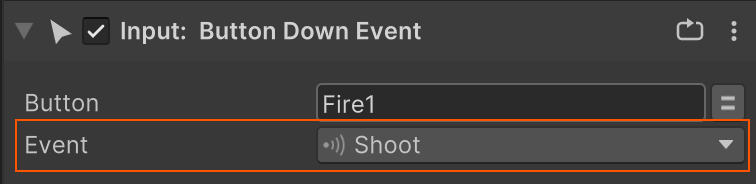
See the Action Editor for more detail on configuring actions.
Update Loop
When a state is active:
- Its actions are updated every frame from top to bottom.
- Finished actions are skipped in the next update.
- When all actions in the list have finished a
FINISHEDevent is sent.
Here's how the action update loop works behind the scenes:
graph LR
    A["State Becomes Active"] --> B["Update Actions"]
    B --> C["Are All Actions Finished?"]
    C -- Yes --> D["Send FINISHED Event"]
    C -- No --> B
PlayMaker visually shows the status of each action while the state is running:
- ✅ Active actions have a green highlight while playing.
- 💤 Finished actions are dimmed to show completion. (You can customize this in Settings.)
See Also
- Action List - Editing the Action List.
- Action Editor - Configuring actions.
- Update Mode - Control how an action updates.
- Action Browser - Find actions to use in your FSMs.
- Addons Browser - Search actions to import into your project.