Interaction Events
PlayMaker > Browsers > System Events
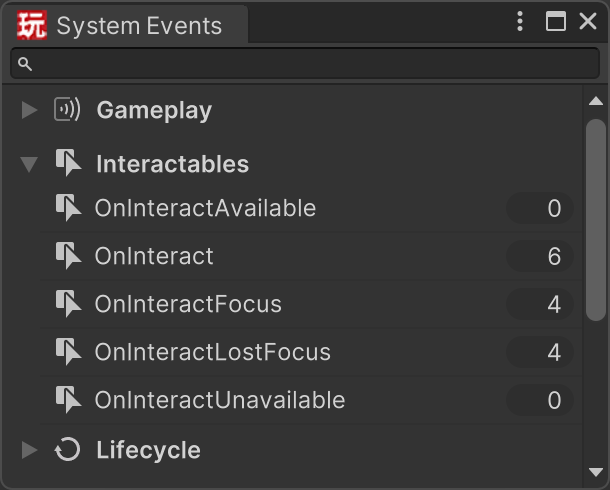
The Interactables system sends system events to:
- FSMs on the Interactable's Target GameObject
- FSMs on the actor GameObject with the Interactor
This gives you two useful places to react:
- on the actor, to drive prompts, reticles, and input flow
- on the target, to drive object behavior such as opening a door, starting a climb, or entering a seat
On this page, current target means the Interactable that currently passes the interaction checks and is the best choice among the valid candidates for this actor.
Event List
| Event | When it is sent | Common use |
|---|---|---|
OnInteractAvailable |
The Interactable becomes available to the actor. | Show a prompt or mark the object as usable. |
OnInteractUnavailable |
The Interactable is no longer available to the actor. | Hide prompts or clear usable state. |
OnInteractFocus |
The Interactable becomes the current interaction target. | Highlight the selected object or update UI text. |
OnInteractLostFocus |
The Interactable stops being the current interaction target. | Remove highlight or clear the current target UI. |
OnInteractStart |
An interaction begins. | Enter a state such as climbing, seated, or using. |
OnInteract |
The interaction is activated. | Run the main interaction logic. |
OnInteractEnd |
The interaction ends. | Exit the interaction and restore normal control. |
Note
Simple interactions often only need OnInteract.
For things like buttons, switches, pickups, or one-shot triggers, you can usually handle the behavior in OnInteract without also using OnInteractStart or OnInteractEnd.
These events can also provide useful data such as the selected Interactable, the target GameObject, the interaction name, activation ID, normal, and measured distance.
Interaction Lifecycle
Not every Interactable uses every event, but the lifecycle usually looks like this:
- The actor moves into a position where an Interactable is valid.
OnInteractAvailableis sent.- If that Interactable becomes the best valid current target,
OnInteractFocusis sent. - When interaction begins,
OnInteractStartis sent. - When the interaction is activated,
OnInteractis sent. - When the active interaction is cleared,
OnInteractEndis sent. - If the Interactable stops being the current target,
OnInteractLostFocusis sent. - If it is no longer valid at all,
OnInteractUnavailableis sent.
OnInteract is not a per-frame update event. It is sent once when the interaction activates.
On this page, "interaction ends" means the Interactor no longer considers that Interactable the active interaction. In practice, that usually means one of these things happened:
- there is no longer a valid activation candidate for the current update
- your FSM explicitly clears the active interaction
- the active Interactable is suppressed or invalidated
A button press might go from focus to OnInteract and finish immediately. Longer interactions such as ladders, vehicles, or elevators benefit more from OnInteractStart and OnInteractEnd.
Here's the same lifecycle as a flow diagram:
flowchart TD
    A["Interactable Becomes Valid"] --> B["OnInteractAvailable"]
    B --> C["Becomes Current Target"]
    C --> D["OnInteractFocus"]
    D --> E["Interaction Begins"]
    E --> F["OnInteractStart"]
    F --> G["OnInteract"]
    G --> H{"Active Interaction Cleared?"}
    H -- Yes --> I["OnInteractEnd"]
    H -- No --> J["Interaction Continues Internally"]
    J --> H
    I --> K{"Still Current Target?"}
    K -- No --> L["OnInteractLostFocus"]
    K -- Yes --> M{"Still Valid?"}
    L --> M
    M -- No --> N["OnInteractUnavailable"]
    M -- Yes --> D

    class B,D,F,G,I,L,N eventNode
    class A,C,E,J stateNode
    class H,K,M decisionNode

    classDef eventNode fill:#8a5a00,stroke:#4a2f00,stroke-width:2px,color:#ffffff
    classDef stateNode fill:#1f5f99,stroke:#123a5c,stroke-width:1.5px,color:#ffffff
    classDef decisionNode fill:#4a5568,stroke:#1a202c,stroke-width:1.5px,color:#ffffff
What "Interaction Cleared" Means
In this lifecycle, an interaction is considered cleared when the Interactor stops tracking that Interactable as the active interaction.
This is what allows the system to send OnInteractEnd and later activate the same Interactable again if it becomes valid for activation.
Common reasons an interaction gets cleared include:
- the current update no longer has a valid activation candidate
- your FSM explicitly clears the active interaction
- the active Interactable is suppressed
- the Interactor loses required runtime context, such as its reference transform
This is different from focus alone. An Interactable can lose focus because a better valid target was found, while active interaction clearing is specifically about ending the current active interaction state.
Choosing the Right Event
Use the availability and focus events for target selection feedback:
OnInteractAvailableandOnInteractUnavailableare good for broad "can use" logic.OnInteractFocusandOnInteractLostFocusare better when you want to react only to the currently selected target.
Use the interaction events for actual gameplay state changes:
OnInteractStartis the best place to set up an ongoing interaction.OnInteractis the main event to handle the activation itself, especially for simple one-shot interactions.OnInteractEndis the best place to clean up after a longer interaction.
Example Patterns
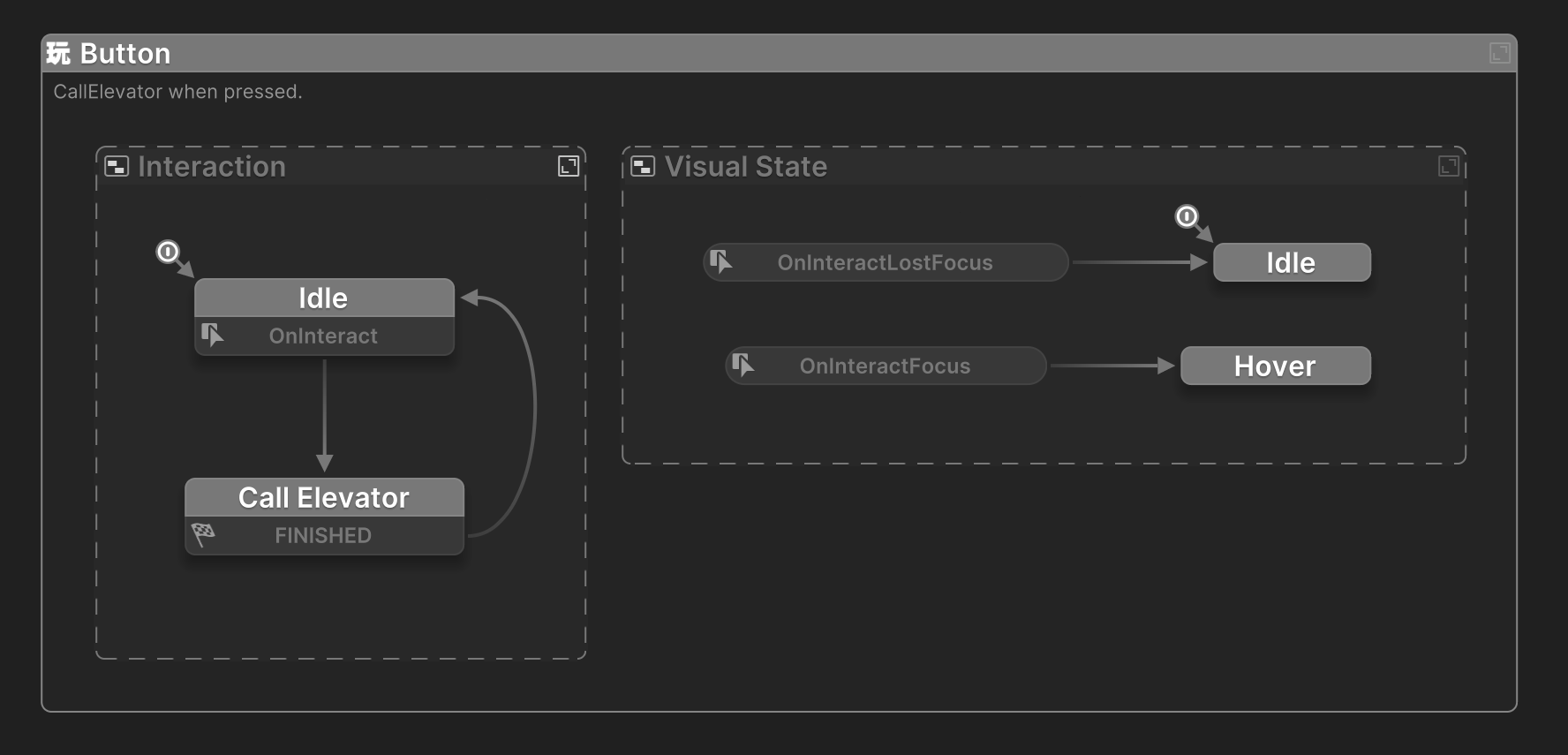
Button
For a button or switch:
- use
OnInteractFocusto show a "Press E" prompt - use
OnInteractLostFocusto hide the prompt - use
OnInteractto play the press animation and trigger the action
Ladder
For a ladder:
- use
OnInteractStartto enter climb mode - use
OnInteractfor the core climb transition or activation logic - use
OnInteractEndto exit climb mode and restore normal movement
Seat or Vehicle
For a seat, turret, or vehicle:
- use
OnInteractAvailableto show that the object can be entered - use
OnInteractStartto dock, align, or hand over control - use
OnInteractEndto undock and return control to the player